
Enter how dark the test line looks next to the control, add your date or DPO, and we will plot your line progression. You will see how the line changed and, with enough comparable tests, a projected day it may match the control.
Pregnancy Test Line Progression Checker
* Interpret each test using its own instructions, control indicator and reading window. A faint colored line can be positive. The percentages above describe entered line darkness and change; pregnancy progress is assessed with clinical testing when needed.
† The curve extends the entered line-darkness pattern. Its control-match date and doubling time describe line appearance, not blood hCG, pregnancy dating or pregnancy health.
How to use this tool
- Add your tests: Use “Add another test” to list each strip or cassette you took.
- Enter timing: Add the test date and time or Days Past Ovulation. Either works.
- Pick brand and hydration: Select the test brand and when you tested, for example first morning urine.
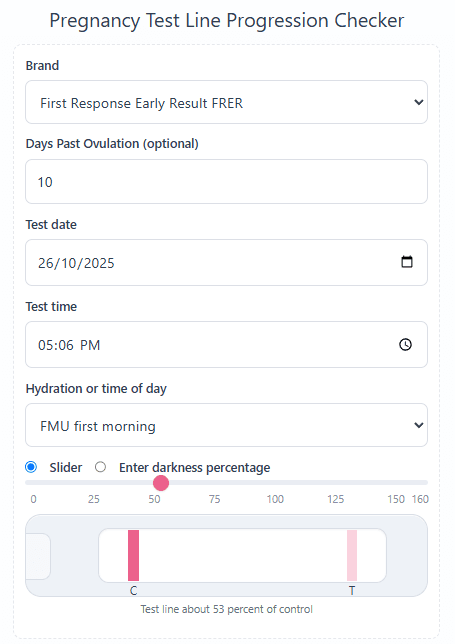
- Set line darkness: Use the slider or enter the test line as a percentage of the control line. Zero means no visible line. Select the test reading if you know it; leave it as unsure if you cannot interpret it.
- Open Advanced options if you want to record a trigger shot date and time or set an ovulation date to auto-fill DPO.
- Calculate: After entering your tests, select Calculate using these tests. If you change an input, select Recalculate to update the result.
Tip: Use the same brand and similar hydration for the clearest trend. Aim for about forty eight hours between tests.
Methodology
The chart plots the darkness percentage you entered for each test. A value of 100% means the test line looks as dark as its control. The trend compares the earliest and latest entries and reports the difference in percentage points. For example, 10% followed by 75% is an increase of 65 percentage points.
Your selected test reading is shown separately from line darkness. An invalid or late reading stays on the chart but is left out of the trend. Brand and hydration entries flag differences that can make visual comparisons harder; they do not change the darkness values you entered. Digital test results can be logged, but their internal strips are not used for line projections.
Dates and times place tests on one timeline. An ovulation date enables a DPO axis. When a test has both a date and DPO, the calculator can infer an ovulation reference. With dates alone, it uses days since the first test; without usable timing, it shows test order.
A visual projection uses at least three nonzero readings matching the latest valid test's brand and hydration setting, with distinct times and steadily increasing darkness. A least-squares line through the logarithms of those percentages gives an exponential curve. Extending that curve to 100% gives the projected control-match date; the curve's growth rate gives the line-darkness doubling time. If the latest comparable line is already at or above 100%, the result says so.
Home pregnancy tests detect hCG qualitatively. Line appearance also varies with test design, urine concentration, lighting and reading time. The chart and projection summarize your observations; medical assessment of pregnancy progress uses symptoms, clinical testing and ultrasound as appropriate. An entered hCG trigger shot adds timing context and a reminder to follow your clinic's testing instructions.
What the chart shows
- Your points: Every test you entered is plotted. Labels show “Test 1”, “Test 2”, and so on.
- Connecting line: A thin line links your points to make the visual trend easy to follow.
- Fitted curve: When there are three comparable timed readings with increasing darkness, a curve extends the visual pattern.
- Control line: The dashed line marks 100%, where the entered test line matches the control.
- Projection: With a clear rise, the tool estimates when your test may match the control and shows the line-darkness doubling time.
Tips for clean inputs
Keep brands consistent
Mixing brands can reduce comparability. If you change brand, note it in the inputs.
Match hydration
First morning urine is usually less diluted. Afternoon or heavy fluids can lighten lines.
Space tests
Leave about forty eight hours between tests for clearer changes in early pregnancy.
Record DPO or dates
Either is fine. Setting ovulation lets the tool build a DPO axis automatically.
- FDA: Pregnancy tests — qualitative hCG detection, test timing and following the kit instructions.
- First Response Pregnancy Test Strips instructions — faint colored lines, invalid readings, hydration and hCG medication. Reading windows vary by product.
- Office on Women's Health: Pregnancy tests — positive, negative and invalid test results and when to retest.
Pregnancy test line progression: FAQs
How do I record line darkness correctly?
Use the slider or type a percentage. Zero means no visible test line. One hundred means the test line looks as dark as the control. Values above 100%, up to 160%, mean darker than the control, often called a dye stealer. Read the test within its instructed time window.
Can a faint line be positive?
Yes. A valid colored test line can indicate a positive result even when it is faint. Check your particular kit's instructions and control indicator. Select the reading shown by the test; the darkness percentage does not decide whether it is positive.
Which readings are used for the trend?
The earliest and latest entries are compared, including zero darkness. Readings marked invalid or read too late are left out of the trend but stay on the chart. The chart uses dates, DPO or test order to arrange your entries.
How is the trend decided?
The latest entered darkness is compared with the first. A larger percentage is darker, a smaller percentage is lighter, and equal values are unchanged. The difference is shown in percentage points. This describes line appearance, not a measured hCG rise.
How many points do I need for a projection?
At least three nonzero readings with distinct times, increasing darkness, and the same brand and hydration setting as your latest valid test. With fewer entries you can still see the observed change and chart. Digital tests are not used for line projections.
Can I mix brands or test at different times of day?
Yes. Your entries stay on the chart. Different brands and hydration can affect line appearance, so the result flags these differences. The projection uses the group matching your latest valid test's brand and hydration setting.
What do the percentages mean?
The latest darkness is your entered estimate compared with the control line. The change is the difference between your first and latest eligible entries, in percentage points. For example, 10% to 75% is an increase of 65 percentage points.
Do darker lines always mean a healthy pregnancy?
Line darkness alone cannot assess pregnancy health. If you have concerns about your symptoms or results, contact your clinician for advice about blood testing or ultrasound.
How does DPO work if I only enter dates?
You can enter DPO directly, set an ovulation date for auto-DPO, or use test dates and times. If you mix DPO and dates, the tool infers a common timeline from entries with both. With dates alone it shows days since the first test.
I had an hCG trigger shot. Will it affect my results?
An hCG trigger can affect a pregnancy test. Record the trigger date and time in Advanced options. The result shows the time from the shot to your latest dated test. Follow your clinic's testing instructions.
What about evaporation lines or reading the test late?
Read within the time window in your kit's instructions. Select Invalid / read too late for a reading outside that window. If you cannot tell what the result means, select Unsure / not recorded rather than changing the darkness to zero. Repeat with a new test according to its instructions.
What should I do about an unexpectedly faint test?
Follow the test instructions and contact your clinician if the result conflicts with earlier results or your symptoms. Do not dilute urine or take a digital test apart to interpret it. Your clinician can advise whether repeat urine testing or a blood test is appropriate.
How often should I test for a clear trend?
Follow your kit's retesting instructions. If you choose to compare line appearance, recording the same brand under similar conditions a few days apart is more useful than repeatedly testing within hours.
Do digital tests work here?
You can log a digital test and select its displayed reading. Leave the darkness setting unused for interpretation; a digital display has no line-darkness measurement. Do not open the test to compare internal strips. Digital entries are excluded from the visual projection.
Does this page store my data?
The calculation runs in your browser. If you submit feedback, the feedback widget can include your entered values and displayed results to help investigate the report.
Support if you have experienced a loss
Reading about miscarriage, stillbirth, or infant loss can be difficult. If you have experienced a loss, you do not have to use this calculator or read the statistics. You may find it more helpful to talk with your care team or a support organization.
In the United States, groups such as:
offer information and bereavement support. If you are elsewhere, your local health service or a pregnancy and baby loss charity may be able to guide you to support in your region.
Home-test interpretation: FDA guidance on qualitative pregnancy tests.